

A customer service chatbot can answer repeat questions, collect the details an agent needs, route a conversation, and provide help outside normal business hours. The useful ones do this without forcing customers through a dead end or making them repeat the problem when a human takes over.
This guide compares customer service chatbots. It does not try to cover the wider customer service software category or replace our guide to AI customer service agents.
Service leaders are investing in AI and data to balance speed with quality: Salesforce's 2024 State of Service research surveyed more than 5,500 service professionals in 30 countries and found continued investment in both areas. The right chatbot should therefore improve a real support workflow, rather than simply add another automated reply. Read the research.
What is a customer service chatbot?
A customer service chatbot is software that handles customer conversations in chat or messaging channels. Depending on the product and its setup, it can answer questions from a knowledge base, guide people through a defined flow, collect information, check basic account or order data, and route a case to the right person or team.
The difference between a helpful chatbot and a frustrating one is not the label "AI." It is whether the bot is grounded in reliable content, knows when to escalate, and hands the conversation over with the relevant context intact.
Customer service chatbot vs. AI customer service agent
The terms overlap, but they should not be used interchangeably.
A customer service chatbot is usually best suited to narrow, repeatable work: answering FAQs, qualifying the issue, gathering information, and routing or handing the customer off. An AI customer service agent can take on a broader role, using context and connected tools to complete more complex tasks and resolve more of a conversation end to end.
Choose a chatbot when the immediate job is self-service, triage, or a clean first response. Explore AI customer service agents when you need deeper autonomy and action-taking.
Scripted chatbots vs. AI chatbots
A scripted chatbot follows predefined rules. It might show buttons, ask a fixed sequence of questions, or send customers to a specific help article based on the option they choose. These chatbots are predictable and can be effective for tightly controlled tasks such as appointment booking, eligibility checks, or a simple return flow.
An AI chatbot interprets the customer's language using natural language processing and searches approved knowledge to answer questions that were not written into an individual decision tree. It also uses machine learning to improve responses over time, which makes it more flexible, but it also makes source quality, testing, and escalation more important. Tidio describes this contrast clearly: its Flows use predefined rules and paths, while Lyro uses AI to understand a question and generate an answer from the support content it is given. See Tidio's explanation.
Neither approach is universally better. Use scripted workflows when the process must be deterministic. Use AI chat when customers express the same question in many ways, when the knowledge base is reliable, and when a human can take over if the answer is uncertain. The most useful customer service setups often combine both.
How to choose a customer service chatbot
Start with the operational problem and the goal to improve customer service, not a feature checklist. A team buried in repetitive "where is my order?" requests needs different capabilities from a B2B support team that must authenticate users, surface technical documentation, and escalate complex cases.
- Knowledge quality: Are the key features aligned with answer quality, including whether the chatbot uses approved help content and lets your team identify the source of an answer?
- Human handoff: Can an agent take over with the customer history, intent, and gathered information still visible?
- Channels: Does it support the web chat, email, messaging apps, or voice channels your customers actually use?
- Control and governance: Can you set escalation rules, manage access to data and actions, test changes before they go live, and meet enterprise grade security requirements?
- Integrations: Does it connect to the help desk, CRM, backend systems, and knowledge base that hold the needed context? Many tools also connect to ecommerce platforms such as Shopify, which matters for e commerce businesses.
- Reporting: Can you measure resolutions, escalations, CSAT, containment, and answer quality, not only chatbot volume?
- Cost model: Is the cost based on seats, conversations, outcomes, messages, or a combination?
Governance deserves the same attention as the interface. NIST's Generative AI Profile calls out human review, tracking, documentation, and oversight as potential risk-management measures. For customer support, that translates into clear escalation rules, source controls, and regular review of conversations the chatbot could not resolve. See NIST's guidance.
Customer service chatbot use cases
The strongest chatbot use cases have three things in common: the request is common, the answer or next step is well defined, and a customer can still reach a person when the situation falls outside the expected path.

Answering frequently asked questions
A chatbot can help visitors resolve routine inquiries and other customer inquiries about delivery, returns, billing, account access, product compatibility, or business hours. The important design decision is not whether to automate the question. It is whether the bot has a well-maintained source to draw from so it can deliver accurate responses.
For example, a retail chatbot may answer questions about a returns window from an approved policy page. If a customer says an item arrived damaged, the conversation should move to a claims or support workflow rather than force the issue into a generic returns answer.
Triaging and routing support requests
Many customer queries do not need an answer immediately. They need to arrive with the right person. A chatbot can capture the product, account type, issue category, urgency, and error message before routing a request to the right queue.
It should also send complex requests to the right queue instead of over-automating them.
Good triage shortens the time to a useful first response. Bad triage adds a form-like barrier at the exact moment the customer needs help. Keep questions limited to information that changes routing or helps an agent resolve the case.
Collecting support context before handoff
For technical support, the chatbot can ask for a product version, operating system, order number, account email, screenshot, and other customer details before handoff. For B2B service teams, it can capture the workspace, user role, and business impact. The agent should receive that information alongside the conversation, not in a disconnected ticket field. Preserving customer context helps the human agent continue without repeating questions.
This use case can deliver value even when the bot resolves very little itself. Better context reduces repetitive questions and gives agents a cleaner starting point.
Supporting order and account self-service
With the right integrations and safeguards, chatbots can help a customer handle order tracking, complete basic account management, update a basic preference, resend a document, or check account status. These self service options work best when the rules and escalation paths are clearly defined. These flows require more care than FAQ answers because the system is working with customer data or taking an action.
Before enabling an action, define authentication rules, the data the chatbot can access, the actions it can perform, and the conditions that should trigger human review. NIST recommends organizations consider governance, testing, content provenance, and incident disclosure when managing generative AI risks. Its Generative AI Profile provides a useful starting point.
Handling lead capture without hurting support
Some chatbots support both sales and service. They can qualify a visitor, suggest relevant resources, and send a sales-ready conversation to the right team. That is useful, but support teams should not let lead-capture logic interrupt an existing customer who needs help.
Separate support and sales entry points where possible. The customer should always be able to state their issue in plain language, and the chatbot should recognize existing customers before treating a conversation as a lead form.
What makes a customer service chatbot effective?
An effective chatbot is not the one that maximizes automation time. It is the one that gets the customer to a correct outcome with the least unnecessary effort and drives improved customer satisfaction.
- Start with a small number of high-volume, low-risk intents.
- Use approved help content rather than asking the model to fill gaps, since that helps produce consistent and accurate responses.
- Write clear fallback paths for uncertainty, negative sentiment, sensitive requests, and repeated failed attempts.
- Let customers reach a human without making them argue with the bot.
- Review failed conversations and use them to improve content, routing, and automation rules, with attention to enhancing customer satisfaction and customer success, not just efficiency.
A chatbot rollout is not a one-time content upload. Policies change, products change, and customers phrase problems in ways the original design did not anticipate. Treat its performance as an ongoing quality program centered on customer satisfaction; when the underlying customer data and content are reliable, personalized responses can strengthen loyalty and satisfaction.
Try LiveChat AND ChatBot
Experience the benefits firsthand with a free 14-day trial — no credit card required.
Trusted by 36,000+ companies

Best customer service chatbots at a glance
| Tool | Best for | Channels | Public pricing, checked Aug. 26, 2026 | Handoff | Main trade-off |
|---|---|---|---|---|---|
| Text / ChatBot | AI chat and human support in one workflow | Website, Messenger, WhatsApp, SMS | From $19 per user/month, billed yearly | Yes | Strongest when using the wider Text workflow |
| Intercom Fin | SaaS and outcome-based automation | Web, email, WhatsApp | From $29 per seat/month plus $0.99 per outcome | Yes | Outcome costs can grow with volume |
| Zendesk AI | Existing Zendesk teams | Messaging, web chat, email | Agent-based plans; confirm regional pricing | Yes | A heavyweight choice for simple chat needs |
| Freshchat | Conversational support across channels | Web, email, WhatsApp, social | Agent plan plus AI-session pricing | Yes | AI usage can sit outside core plan costs |
| Tidio Lyro | SMB and ecommerce teams | Web, email, social | From $32.50/month for 50 AI conversations | Yes | Less suited to complex enterprise controls |
| HubSpot Customer Agent | CRM-led service teams | HubSpot service channels | Pro/Enterprise Hub plus credits from $10 per 1,000 | Yes | Best value for existing HubSpot users |
| Salesforce Agentforce | Enterprise service operations | Digital and contact-center channels | $2 per service-agent conversation | Yes | Heavier implementation and ownership |
| Microsoft Copilot Studio | Microsoft-centric teams | Web, Teams, messaging connectors | $200/month for 25,000 messages or pay-as-you-go | Configurable | Requires more setup than a turnkey tool |
| IBM watsonx Assistant | Governance-focused enterprises | Web, phone, SMS, messaging | Usage and enterprise pricing | Configurable | Commercial model requires a tailored quote |
| Google Dialogflow CX | Technical teams building custom bots | Chat, voice, telephony | Consumption-based | Configurable | Requires technical implementation |
| Rasa | Pro-code control and custom deployment | Web, messaging, voice | Free developer edition; enterprise pricing is custom | Configurable | Needs ongoing technical ownership |
This comparison covers a broad customer service platform landscape. Some entries are fuller customer support platform products, while others are narrower chatbot builders.
Pricing and packaging change regularly. Prices above are public USD reference prices or the vendor's published pricing basis, not a quote. Confirm current terms on each official pricing page and model costs using your expected contact volume rather than a headline plan price.
How to compare chatbot pricing
Chatbot pricing can be harder to compare than it first appears. A low entry price may cover only seats or basic chat, while AI answers, resolved conversations, messages, premium channels, or integrations are billed separately, and pricing often changes across a free plan and paid plans as usage grows.
- Estimate monthly conversations and identify the share that is a realistic chatbot candidate, especially if you expect AI-powered chatbots to handle high volumes.
- Estimate how many candidate conversations need a human handoff.
- Check whether a vendor bills an answer, message, conversation, resolution, procedure, or active user, and model pricing around realistic support demand.
- Include the cost of the support workspace if the chatbot does not work with your existing one.
- Budget for implementation, knowledge-base cleanup, integrations, and ongoing quality review, since those extras often sit outside entry pricing on paid plans.
Outcome-based pricing can align costs with value, but only if the product's definition of an outcome matches your service standard. Intercom publishes separate definitions for resolutions, procedure handoffs, disqualifications, and qualifications. Review the definitions before comparing it with per-seat tools.
How to test a chatbot before you buy
A polished demo is not enough. Test each candidate on how well the bot handles real customer interactions, not just a scripted demo, using real, anonymized customer questions from your own support queue.
Create a short evaluation set with common questions, ambiguous questions, out-of-policy requests, requests that require authentication, and questions that should escalate immediately. Include spelling errors, informal phrasing, and incomplete information.
| Test area | What to evaluate |
|---|---|
| Answer quality | Is the answer accurate, complete, clear, and grounded in approved content? |
| Escalation | Does it hand off at the right moment, with the conversation context intact? |
| Retrieval | Does it find the correct policy or help article, rather than a plausible but irrelevant answer? |
| Safety | Does it avoid making commitments, exposing data, or taking an action outside its permissions? |
| Operations | Can support managers update content, review conversations, understand the reports, and see whether the bot maintains consistent support under load? |
| Customer experience | Is the flow quick, natural, and easy to leave for human support across scenarios? |
Strong tools should also cope with thousands of customer interactions simultaneously without losing answer quality.
Do not measure only containment. A chatbot that keeps a customer away from an agent but leaves the problem unresolved can make service metrics look better while making the customer experience worse.
1. Text / ChatBot

Best for: teams that want chatbot automation and human support in the same customer conversation workflow.
Text is a strong fit when you do not want a chatbot to sit apart from the people who resolve harder cases. Its AI capabilities, inbox, ticketing, proactive chat, and escalation options are designed to work as part of one support operation and deliver instant support.
The practical advantage is context-preserving handoff. The chatbot can answer routine questions and handle repetitive tasks, then give an agent the conversation with context preserved instead of asking the customer to start again. It is particularly relevant for teams that want one operating environment for chat, automation, sales conversations, and support.
Watch for: the best fit is teams that want the broader Text workflow, not only a standalone widget. Review current plans and trials.

2. Intercom Fin
Best for: SaaS and mid-market support teams that want AI built into their service workspace.
Fin is designed to work from support content and hand conversations to a human when needed. Intercom distinguishes a chatbot that answers or routes from an agent that can resolve a request or complete a configured procedure, making it useful for teams that want to measure automation by outcomes across customer issues rather than just deflection, and to monitor customer satisfaction alongside automation results. Intercom explains its AI chatbot approach here.
It is worth shortlisting if your support operation already runs in Intercom, or if you want an AI layer that can work with an established help center and inbox.
Watch for: outcome pricing requires careful forecasting at scale. Check the current outcome rules and rates.
3. Zendesk AI

Best for: support organizations already standardized on Zendesk.
Zendesk makes the most sense when you want AI assistance inside the same service environment as tickets, help content, routing, reporting, and ai powered insights. Existing Zendesk customers can usually keep their support processes and governance more coherent than they would by adding an unrelated chatbot layer.
Zendesk says its AI is trained on over 18 billion support interactions.
The trade-off is that Zendesk is a broad service platform. That depth is valuable for mature support organizations, but it can be excessive for a small business with a simple FAQ and chat-handoff need.
Watch for: it is a fuller service-suite choice, so it can be heavier than a lightweight chatbot. See Zendesk AI capabilities and current plan details.
4. Freshchat

Best for: teams looking for a conversational support workspace with broad digital-channel coverage.
Freshchat combines a shared inbox, messaging, and chatbot capabilities to help teams deliver consistent support across multiple channels, including websites and mobile apps. It is worth considering for teams that want a familiar support-software operating model with automated answers and routing, rather than a developer-first bot platform.
It can be a practical middle ground for teams that need more than a website widget, but do not need the implementation footprint of an enterprise conversational AI project.
Watch for: understand which AI features are included in the base plan and which are metered separately. Review the product and official pricing.
5. Tidio Lyro

Best for: SMB, direct-to-consumer, and ecommerce teams that need a quick path to AI self-service.
Tidio is geared toward launching chat support without a large implementation, so lean teams can deploy AI agents quickly. Lyro can be a practical choice when the immediate need is automating common questions while giving customers a straightforward route to a person.
It is most compelling where speed matters: an ecommerce team with a manageable knowledge base, a high number of pre-purchase questions, and limited capacity to maintain a complex bot, with setup often possible in just a few clicks for SMB use cases.
Automation at this level can save companies up to $14,000 monthly by handling common queries.
Watch for: it is generally a better match for lean teams than organizations needing complex governance or deeply custom case workflows. Explore Lyro and confirm current pricing.
6. HubSpot Customer Agent

Best for: teams whose service data, tickets, and customer history already live in HubSpot.
HubSpot's advantage is CRM context. If the chatbot can work with the same customer record and service workflows as the team, it can reduce fragile integrations and duplicated data while keeping responses aligned with the company’s brand voice.
That can be especially useful for companies that use the same CRM across marketing, sales, and service.
CRM context can also support personalized greetings using customer data.
Watch for: its value is strongest for existing HubSpot customers, rather than teams seeking a standalone chatbot. See Customer Agent and review Service Hub pricing.
7. Salesforce Agentforce

Best for: enterprise service organizations with established Salesforce data and processes.
Agentforce is aimed at companies that need AI agents to operate close to CRM records, service workflows, and contact-center processes. It is a credible contender for large organizations, especially those already invested in Salesforce Service Cloud.
Salesforce positions them as able to autonomously resolve over 80% of interactions.
Enterprises should assess it as part of a wider operating model: data permissions, knowledge management, action boundaries, reporting, and the teams responsible for monitoring quality.
Watch for: implementation, ownership, and commercial complexity are usually greater than with SMB tools. Read Salesforce's Agentforce overview and current pricing information.
8. Microsoft Copilot Studio
Best for: Microsoft-heavy organizations that need to build and publish tailored support experiences.
Copilot Studio is closer to a low-code builder than a ready-made customer service chatbot, and its drag and drop builder experience adds to the appeal for teams that want easier setup inside Microsoft's ecosystem. It can be a strong fit if your team needs custom integrations, workflow automation, and is already comfortable with Microsoft's ecosystem.
It is a sensible shortlist for organizations that already manage identity, collaboration, and business processes through Microsoft.
Watch for: more flexibility also means more setup and ongoing ownership. Explore Copilot Studio and its pricing model.
9. IBM watsonx Assistant
Best for: enterprises where control, security, and deployment choices are central buying criteria.
watsonx Assistant is a conversational AI platform for teams that need more than a polished out-of-the-box chat experience. It is worth evaluating when governance, deployment flexibility, and advanced automation matter as much as chatbot speed to launch, especially for buyers considering an enterprise plan.
It is most relevant when security review, hosting choices, and organizational controls are part of the buying process.
Watch for: the commercial model can be less intuitive than a simple per-seat plan. Review IBM's product page and pricing documentation.
10. Google Dialogflow CX
Best for: technical teams that want to design a custom customer service chatbot, including voice experiences.
Dialogflow CX is a platform choice rather than a turnkey support tool. It is a good fit when your organization needs control over conversation design and can dedicate technical resources to integration, testing, and maintenance.
It is especially worth considering for complex, voice-led customer journeys where multilingual support and handling multiple languages are part of the experience design.
Watch for: it is not the fastest route for nontechnical support teams. See Dialogflow CX features and Google Cloud's pricing documentation.
11. Rasa
Best for: organizations that want pro-code control over assistant behavior, integrations, and deployment.
Rasa is the most technical option in this list. It suits teams prepared to treat a chatbot as a product they own, rather than a plug-in they configure once.
That usually means a cross-functional team with engineering ownership, support expertise, and a clear process for testing changes against real customer scenarios.
Watch for: technical ownership is essential to realize its flexibility. Learn about Rasa and review its available plans.
How to implement a customer service chatbot
The fastest way to lose trust in a chatbot is to launch it against messy, incomplete, or contradictory content. Implementation should begin with support operations, not the chat interface.
1. Pick a narrow first release
Choose three to five common, low-risk customer inquiries that are supported by clear documentation. Good candidates include shipping questions, password-reset guidance, product availability, account-access basics, and return-policy questions.
Strong first-release use cases are the ones many chatbots can resolve autonomously, in some cases over 80% of customer inquiries.
Avoid launching first with account cancellations, billing disputes, legal questions, medical or safety concerns, or sensitive personal data. Those requests often need judgment, policy exceptions, or identity verification that a first-release chatbot should not own.
2. Audit the knowledge source
List the help articles, policy pages, product documents, and internal procedures the chatbot will use. Remove outdated content, resolve conflicting guidance, and assign an owner to each important source.
If the chatbot cannot find a trustworthy answer, it should say so and offer a human handoff. A graceful escalation is better than a confident answer based on a stale policy.
3. Define the handoff experience
Handoff should be a designed workflow, not a generic fallback. Decide when it happens, where the conversation goes, and what the agent receives. Include the customer’s original question, the sources the chatbot used, any authentication state, and the information already collected, so the next person has enough context to provide immediate support.
Also set customer-facing expectations. If a live agent is unavailable, say when a response is likely and give the customer a path to leave their details or create a ticket. The chatbot can also add proactive support by clarifying next steps or setting expectations before an agent joins.
4. Test with realistic conversations
Test normal requests, incomplete requests, emotionally charged messages, typos, multiple questions in one message, and requests for actions the chatbot cannot take. Ask agents to review the output and use customer feedback in that testing, because they know which answers are technically correct but unhelpful in practice.
NIST's AI Risk Management Framework emphasizes managing risk across an AI system's lifecycle, rather than treating governance as a final compliance review, and these tests can also reveal customer behavior when people phrase the same issue differently. Its framework and resources are a useful reference for creating an ongoing test-and-review process.
5. Launch with monitoring and clear ownership
Assign named owners from customer service teams for the knowledge base, chatbot configuration, integrations, and performance reporting. In the first weeks after launch, review escalations, fallback messages, customer complaints, and unresolved cases frequently. Fixing a handful of bad paths early has a larger effect than expanding the bot into new areas too quickly.
Effective automation can save human agents around 360 hours each month by handling common inquiries.
Customer service chatbot metrics to track
| Metric | Why it matters | Watch out for |
|---|---|---|
| Resolution rate | Shows how often the bot reaches a meaningful outcome | Definitions vary by vendor; establish your own quality threshold |
| Escalation rate | Reveals which intents still need a person | A lower rate is not automatically better |
| Repeat-contact rate | Indicates whether the answer actually solved the problem | Attribute repeats to the same issue where possible |
| CSAT after chatbot contact | Captures the customer perspective and Customer Satisfaction Scores | Collect enough responses to avoid overreacting to small samples |
| First-response time | Shows how quickly customers receive useful help | Speed without accuracy is not service quality |
| Agent handle time after handoff | Measures whether the bot gathered useful context | Compare similar case types, not every ticket |
| Knowledge gaps | Identifies questions without approved answers | Turn recurring gaps into content improvements |
Review these metrics by customer intent, language, channel, and customer segment. Use that segmented view to monitor customer satisfaction and understand customer behavior. An overall average can hide a broken flow for a high-value group or a particular product.
Real-world customer service chatbot examples
These examples show how organizations use ChatBot alongside human support to solve operational problems.
Wembley Stadium: handling unpredictable demand
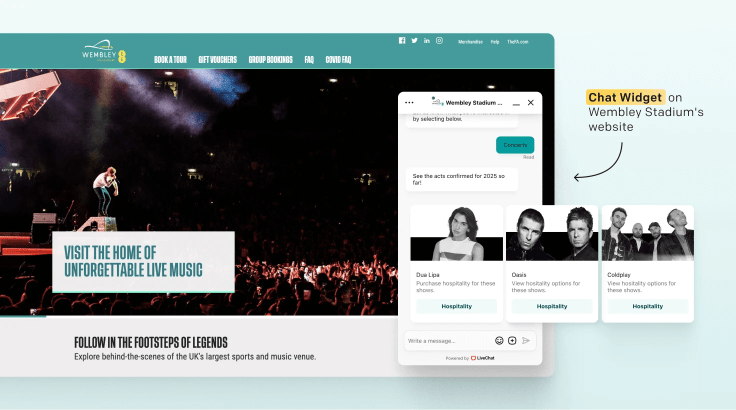
Wembley Stadium uses ChatBot and LiveChat to manage ticket, hospitality, accessibility, and event questions. The chatbot handles an average of 12,000 chats each month; the team said it can prepare the AI knowledge for new events quickly, reducing the support-ticket load. Within eight months, Wembley also reported more than $1.5 million in revenue from sales sourced through the chat widget.
Read the Wembley Stadium case study.
Funded Trading Plus: preserving service quality at scale
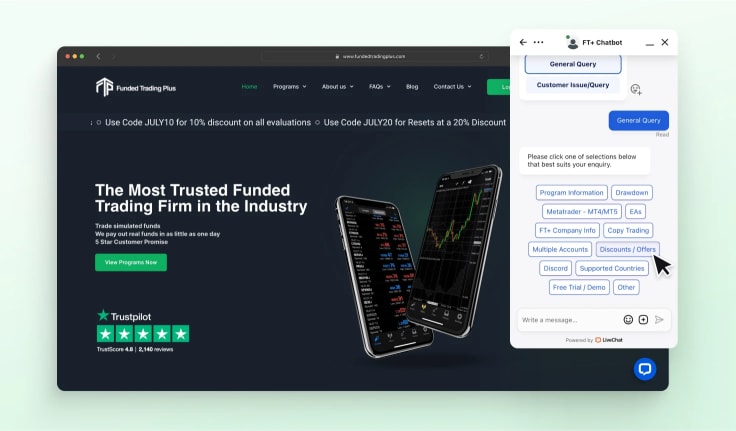
Funded Trading Plus reported that its chatbot handles about 125,000 chats a year, with a 93% CSAT score in automated chats and an 18% workload reduction. During an industry disruption that caused a 1,500% increase in customer inquiries, the team adjusted its chatbot flows to provide timely information and route cases that needed human support.
Hairlust: one localized experience across 13 sites

Hairlust used a single chatbot flow across 13 localized ecommerce sites and more than 800,000 monthly visitors. The company reported a 20% reduction in communication time, showing how localization and centralized upkeep can make chatbot automation practical for a multi-market brand.
Rainforest Alliance: making information easier to access
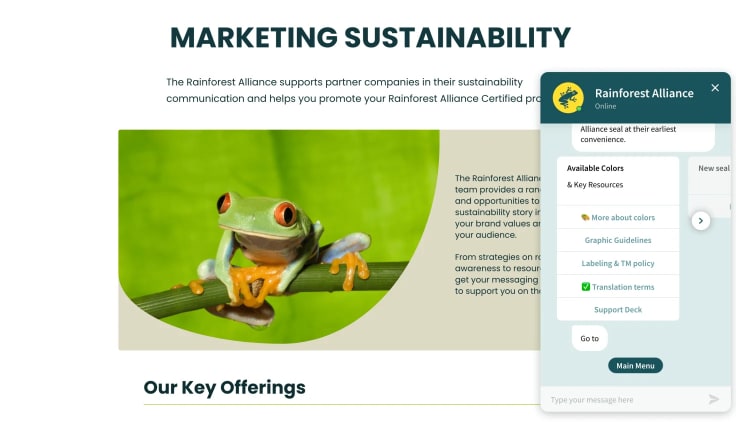
The Rainforest Alliance used a chatbot to support more than 1,200 users each month with frequently asked questions and information about its initiatives. The lesson is simple: a chatbot can make structured information accessible at any hour while freeing people to handle more complex requests.
Read the Rainforest Alliance case study.
Valley Driving School: automating routine enrollment questions
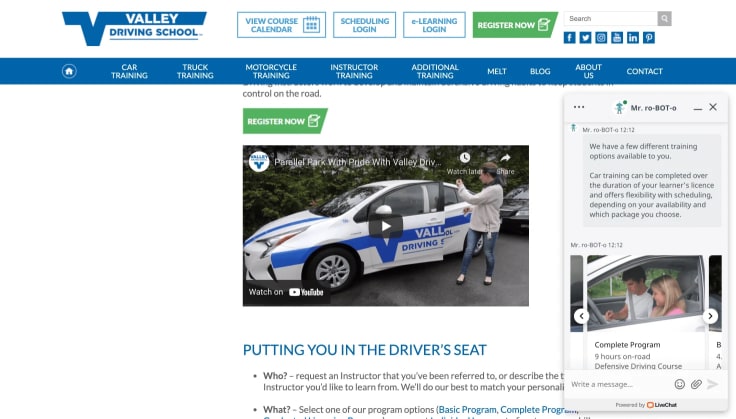
Valley Driving School used a chatbot to answer common course questions, schedule appointments, and share information about driver-training programs. The company reported a 94% customer-satisfaction rate, illustrating the value of keeping early automation focused on well-defined, repeatable questions.
Read the Valley Driving School case study.
When a chatbot is enough and when you need full customer service software
A customer service chatbot may be enough when the main job is self-service, triage, basic data collection, and routing. It can reduce the load from repeat questions, help with lowering operational costs, and make help available when an agent is not online.
Businesses using chatbots can reduce operational costs by around 30%.
It is not a complete replacement for the rest of a support operation. If you also need ticketing, SLAs, shared inbox rules, workforce management, quality assurance, and reporting across channels, you are evaluating customer service software, not just a chatbot.
Where chatbots fit in customer service automation
Chatbots are usually the front door of a wider automation system. Modern AI customer service chatbots answer routine questions, collect inputs, route customers, and handle simple actions before a person needs to step in. They are one part of customer service automation, not a replacement for every service process.
AI chatbots are expected to reduce operational costs by 30% by 2029 as automation expands. For the larger AI support picture, explore LiveChat AI. For a chatbot that can automate routine conversations and hand off to a human team in one workflow, see Text pricing and trial options.