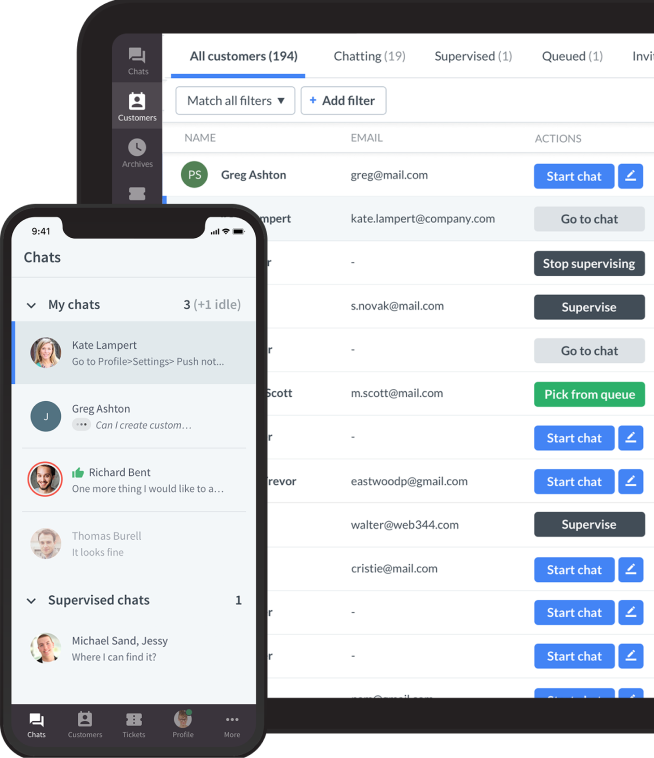


An AI customer service agent is software that can understand a customer request, use knowledge and connected systems, take a permitted next step, and escalate the conversation when a person should take over.
A chatbot may answer an FAQ, collect information, or route a request. An AI agent can do more within the rules you set: look up an order, update a record, start a return, apply an approved policy, or prepare a complete case for a human agent.
The distinction matters because support teams are no longer evaluating AI only as a faster way to answer questions. They are evaluating whether it can resolve a useful share of work without creating new risk, confusion, or customer frustration.
Salesforce's State of Service research, which surveyed more than 5,500 service professionals, describes continued investment in AI and data across service operations. The practical question for a support leader is not whether AI exists. It is which work it should own, which work it should assist with, and where it must stop.
Evidence from customer operations supports a measured approach. McKinsey cites research at a company with 5,000 customer service agents where generative AI increased issue resolution by 14% an hour and cut issue-handling time by 9%; the benefits were strongest for less-experienced agents. That is a case for designing AI around a specific workflow and human team, rather than treating it as a universal replacement.
This guide explains how AI customer service agents work, how they differ from chatbots, where they fit into a support operation, and how to implement them without sacrificing customer trust.
What is an AI customer service agent?
An AI customer service agent is a customer-facing or agent-facing system that uses AI to understand requests, retrieve relevant information, make constrained decisions, and complete defined tasks.
It may work in web chat, email, messaging apps, voice channels, or inside a support workspace. It can be customer-facing, behind the scenes, or part of a shared workflow with a human agent.
It understands intent
Customers rarely phrase issues in the exact language used in a help center. One person asks, "Where is my package?" Another asks, "Why hasn't my order moved?" A capable AI agent can recognize that both requests may need order-status information.
Intent recognition helps reduce the number of rigid menu choices a customer must navigate. It also gives the system a basis for choosing an approved workflow.
It uses a source of truth
An AI agent should not invent a policy, delivery estimate, or billing answer. It needs approved sources, such as a knowledge base, order-management system, CRM, policy document, or product catalog.
Source quality determines answer quality. If the underlying documentation is contradictory or stale, an AI agent makes that problem visible faster rather than solving it.
It can take an approved action
The defining feature of an AI customer service agent is action within boundaries. It may look up an order, reset a password, update a shipping address, issue an approved refund, create a ticket, or schedule an appointment.
The action should be narrow, traceable, and reversible where possible. A good first implementation does not give the agent every permission at once.
It knows when to escalate
An agent needs a clear route to a person when confidence is low, the request is unusual, emotions are high, or the consequences of being wrong are serious.
Handoff is not a failure. It is part of a well-designed agent experience. The customer should not have to repeat their question, and the human should receive the conversation history, collected details, relevant sources, and action history.
AI customer service agent vs. chatbot
The two terms are often used loosely, but they represent different levels of capability and responsibility.
A chatbot is typically a conversation interface. It may answer FAQs, guide a customer through a predefined flow, capture basic details, and direct the conversation to the right team.
An AI customer service agent adds a decision-and-action layer. It uses approved context to decide what should happen next and can complete an allowed workflow rather than merely describing it.
| Capability | Chatbot | AI customer service agent |
|---|---|---|
| Primary job | Answer questions, collect details, and route requests | Move an approved support workflow toward resolution |
| Information used | FAQs, scripted flows, and basic form inputs | Approved knowledge plus connected customer and operational systems |
| Actions | Direct customers to a next step or create a basic ticket | Retrieve records, assess rules, update a system, or start a permitted process |
| Best fit | Predictable FAQs, qualification, and basic routing | High-volume workflows with reliable data, clear rules, and controlled actions |
| Human handoff | Transfers when a flow ends or the customer requests help | Escalates with the request, collected context, sources, and action history |
What a chatbot does well
Chatbots are effective when requests are predictable and the appropriate response is already known. They are useful for FAQ answers, basic qualification, simple routing, and collecting information before a handoff.
They are often the right first step for a team that needs faster self-service but is not ready to connect AI to customer records or operational workflows.
What an AI agent adds
AI agents can retrieve context from more than one source, follow rules across a workflow, and use connected tools to take a permitted action.
For example, instead of telling a customer where to find a return policy, an agent can verify the purchase, assess eligibility against the policy, create a return request, and explain the next step.
Where the boundary should stay
The agent should not make high-impact decisions simply because it can generate a plausible explanation. Exceptions, chargebacks, safety issues, legal questions, retention conversations, and sensitive identity problems often require human judgment.
The goal is not to make the agent act human. The goal is to make its responsibilities explicit and reliable.
Which page should a reader use?
If you are choosing a tool for FAQ automation, triage, basic routing, or a chatbot experience, see our guide to customer service chatbots.
How AI customer service agents work
An AI customer service agent combines conversation, retrieval, workflow logic, and human oversight. The technology matters, but the operating design matters more.
Step 1: receive the request
The customer begins in a channel such as website chat, email, WhatsApp, social messaging, or voice. The agent identifies the request, language, and available customer context.
Good design lets the customer explain the problem in their own words. It does not make every person select from a long menu before they can ask for help.
Step 2: classify the request
The agent identifies the intent, urgency, and likely workflow. It may recognize an order-status request, password problem, product question, cancellation request, or billing dispute.
Classification is not only about labels. It determines whether the agent can answer, take an action, ask a clarifying question, or route the conversation to a person.
Step 3: retrieve approved knowledge
For an informational request, the agent should search trusted sources. Those may include a help center, policy pages, internal documentation, and product data.
The best systems make it possible to inspect which sources informed an answer. That helps teams improve content and audit mistakes.
Step 4: check permissions and rules
Before taking an action, the agent should confirm that the customer is authorized and that the action fits the business rules.
For a return, this may mean checking the purchase date, item category, region, and return window. For an account change, it may mean verifying identity before exposing or editing data.
Step 5: take the action or respond
If the request is safe and within scope, the agent completes the action and tells the customer what happened. If it cannot complete the action, it should explain the next available step without pretending the matter is resolved.
Step 6: escalate with context
If the request is outside the agent's permissions or confidence threshold, it should hand off. The next person needs the original request, details gathered, prior steps, and any relevant customer record.
This is where many AI deployments disappoint. A technically successful handoff still feels poor when the customer must restate everything.
Types of AI customer service agents
AI customer service agents can take different roles inside a support operation. Most mature teams use more than one role rather than trying to make one system solve every problem.
Frontline resolution agents
Frontline agents interact directly with customers. They answer questions, collect details, retrieve account information, and complete approved actions.
They work best for high-volume requests with clear rules and reliable data, such as order tracking, returns eligibility, password resets, appointment changes, and basic account updates.

Triage and routing agents
Triage agents identify what the customer needs, estimate urgency, collect the right context, and assign the conversation to the correct queue.
They are valuable even when the agent resolves nothing on its own. Better routing can reduce transfers, avoid unnecessary questions, and help specialist teams begin with the information they need.
Agent-assist copilots
An agent-assist copilot supports employees rather than speaking directly to customers. It can suggest responses, summarize a long thread, surface a policy, translate a message, or prepare a ticket update.
This is usually a lower-risk place to start because a human reviews the output before it reaches the customer.
Workflow agents
Workflow agents operate across systems. They may open a case, update a CRM field, check an inventory system, notify a customer, or run an approved follow-up sequence.
The customer may never see this layer, but it can remove repetitive back-office work and make handoffs more consistent.
Hybrid AI-human agents
Hybrid workflows combine automation and human judgment. The AI agent handles common, well-defined work and prepares more complex cases for a person.
This is often the most realistic design for customer service because many customer journeys begin with a simple question but become complex, emotional, or commercially sensitive.
AI customer service agent use cases
The best use cases are not chosen because they sound impressive. They are chosen because the volume is meaningful, the answer is verifiable, the action is clearly defined, and the cost of a mistake is manageable.
Order tracking and delivery updates
Order-status questions are a strong starting point because the answer usually exists in a connected commerce or logistics system. The agent can retrieve the latest status, explain the expected delivery window, and share the appropriate next step.
When a delivery is late, the agent should not merely repeat tracking information. It should identify whether the issue meets the threshold for a claim, replacement, or human review.
Returns and exchanges
An agent can check whether an item is eligible for return, explain policy requirements, generate a return request, or route an exception to a specialist.
The key is to define what is deterministic and what needs judgment. A standard return within the window is different from a damaged item, a missing package, or a loyalty exception.
Account access and password help
Password resets, verification guidance, and access troubleshooting can be automated safely when identity checks and action permissions are designed carefully.
The agent should never expose sensitive information simply because the customer knows an email address or account number.
Subscription and billing updates
For subscription businesses, agents can explain plan differences, update payment details, process an approved plan change, or collect context before a cancellation conversation.
Cancellation is an especially important boundary. An agent may complete a straightforward request, but a customer who has experienced repeated service failures may need a retention specialist rather than an automated confirmation.
Product guidance and recommendations
An agent can help customers compare products, find compatible items, understand sizing, or choose an appropriate plan. In ecommerce, it can use catalog and availability data to avoid recommending unavailable items.
The experience should remain helpful rather than pushy. A support conversation is not automatically a lead-generation form.
Technical troubleshooting
For known issues, an AI agent can guide a customer through diagnostic steps, collect environment details, and identify when a case needs engineering support.
It should avoid claiming that an issue is fixed when it has only suggested a possible step. Confirmed resolution and suggested troubleshooting are different outcomes.
Appointment and service scheduling
Businesses in education, home services, healthcare administration, and professional services can use agents to find availability, book an appointment, reschedule, or prepare the customer for the visit.
The agent needs access to accurate availability and clear escalation rules for exceptions, urgent requests, and situations that require a qualified person.
After-hours intake
When no live team is available, an agent can collect the issue, answer straightforward questions, set a realistic expectation, and prepare a complete case for the next shift.
This is more useful than a generic contact form because the customer receives immediate guidance and the support team receives structured context.
What AI customer service agents should not do
The boundary around automation is as important as the opportunity. A customer service agent should not be judged only by the number of conversations it contains.
An AI system that blocks a customer from reaching help may improve a short-term deflection metric while damaging trust and repeat purchase.
Do not automate high-stakes judgment
Legal issues, safety concerns, fraud, medical guidance, discrimination complaints, and serious financial disputes should follow controlled human-led processes.
The agent can recognize the topic, collect minimal necessary context, and route the case. It should not improvise an outcome.
Do not hide the route to a human
Customers should be able to ask for a person. The exact design can depend on the channel and business hours, but the route should be understandable.
Forcing a customer to repeat a phrase or complete a long flow before handoff is a design failure, not an efficiency gain.
Do not use stale or conflicting content
If policy pages conflict or product information is outdated, the agent may confidently deliver the wrong answer. Content governance is therefore part of customer service operations.
Assign owners to important knowledge sources, define review dates, and monitor questions the agent cannot answer reliably.
Do not give broad permissions on day one
Start with a narrow action set. Add permissions only after the team has reviewed real conversations, tested edge cases, and confirmed that customers understand what happened.
Reversible actions, approval requirements, and audit trails make early deployment safer.
Do not confuse a generated answer with a resolution
A fluent answer can still be wrong, incomplete, or unhelpful. Resolution should mean the customer received a correct result or was moved efficiently to the person who can provide one.
Measure repeat contact, escalation quality, and customer feedback alongside resolution rate.
Gartner reports that the average self-service customer-support success rate is only 14%. That is a useful corrective to inflated automation claims: a credible AI agent strategy must make it easier to reach a successful outcome, including human assistance when the agent is not the right route.
| Support situation | Recommended AI role | Keep or send to a human when |
|---|---|---|
| Order status or delivery update | Retrieve the latest approved data and explain the next step | The order is lost, delayed beyond policy, or needs an exception |
| Standard return request | Check eligibility and create the return within defined policy | The request involves damage, a missing parcel, or a loyalty exception |
| Password or account-access help | Guide verification and complete a controlled reset | Identity cannot be verified or the account may be compromised |
| Product comparison | Retrieve current product, compatibility, and availability data | The customer needs specialist advice or raises a safety concern |
| Billing dispute, fraud, or chargeback | Collect minimal context and route immediately | Always; these cases need a controlled human-led process |
| Cancellation after a service failure | Confirm a straightforward cancellation request | The customer is distressed, has repeated failures, or needs retention judgment |
AI agent governance and human oversight
AI customer service agents need operating rules, not just prompts. Governance protects customers, employees, and the business when the system retrieves information or takes action.
NIST's Generative AI Profile highlights governance, pre-deployment testing, content provenance, and incident disclosure as key considerations for managing generative AI risk.
Define the agent's job
Write down the requests the agent may handle, the sources it may use, the actions it may take, and the situations that require escalation.
If the team cannot explain the role in plain language, the agent's scope is probably too broad.
Define decision thresholds
Set rules for when the agent may act automatically, when it should ask a clarifying question, and when it should hand off.
Confidence should not be the only threshold. Customer value, issue sensitivity, history of failed attempts, and the reversibility of an action can matter more.
Protect customer data
Use the minimum customer data necessary for the task. Limit who can access sensitive information, verify identity before account actions, and maintain logs that allow the team to investigate a problem.
Customers should understand when they are interacting with AI and how their data is being used within the support experience.
Test before deployment
Test routine questions, incomplete requests, spelling errors, emotional messages, ambiguous language, attempted policy exceptions, and requests that should always escalate.
Include support agents in testing. They can identify answers that are technically plausible but operationally wrong.
Review incidents and edge cases
Create a process for reviewing failures, complaints, risky outputs, and cases where a customer needed to contact support again.
The point is not to eliminate every error. It is to learn from errors quickly and prevent the same pattern from recurring.
Real-world AI customer service agent examples
The most useful examples demonstrate a specific operational outcome, not an abstract promise of efficiency.
| Organization | Reported result | What it demonstrates |
|---|---|---|
| Wembley Stadium | 12,000 chats per month; more than $1.5M in chat-sourced sales over eight months | Updating knowledge quickly for volatile demand and routing qualified conversations |
| Funded Trading Plus | 125,000 yearly chats; 93% CSAT in automated chats; 18% workload reduction | High-volume support, reliable escalation, and rapid flow changes during disruption |
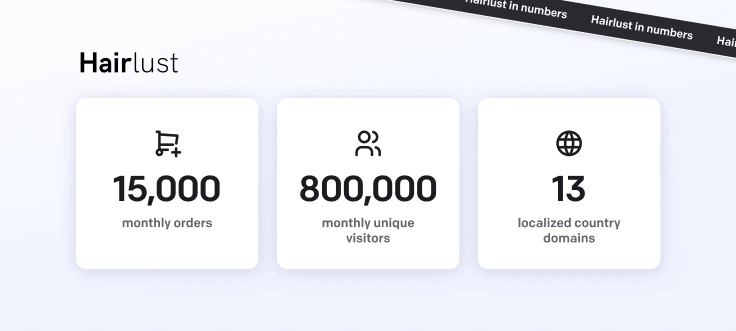
| Hairlust | 13 localized sites; 800,000+ monthly visitors; 20% communication-time saving | Localized, centrally managed self-service across multiple markets |
Wembley Stadium: scaling support around event demand
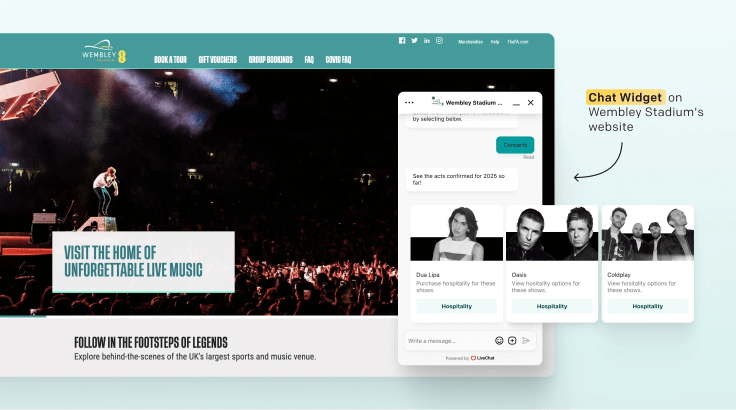
Wembley Stadium uses ChatBot and LiveChat to manage questions about tickets, hospitality, accessibility, and events. The organization reported that ChatBot handles an average of 12,000 chats per month and helps reduce incoming support tickets during unpredictable demand spikes.
The lesson is that knowledge must be easy to update. For an event business, the agent needs current information about each event, not a generic support script.
Funded Trading Plus: combining automation and escalation
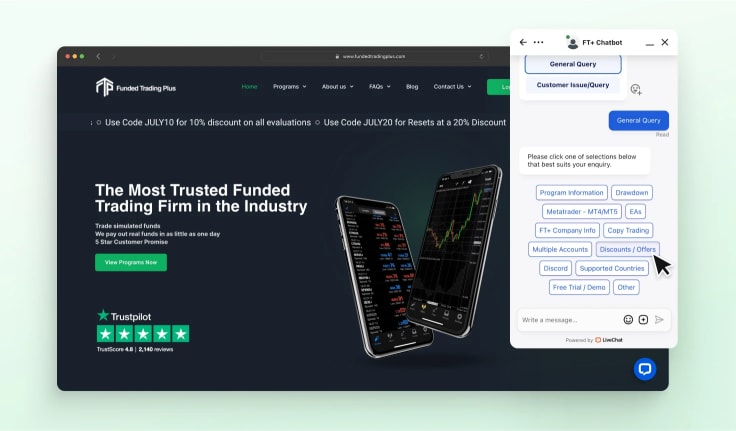
Funded Trading Plus reported that its chatbot handles roughly 125,000 chats a year, reached 93% CSAT in automated chats, and reduced workload by 18%. During an industry disruption that drove a 1,500% increase in inquiries, the team updated flows and used human support for cases that needed it.
The important pattern is not the percentage alone. It is the combination of high-volume automation, current information, structured ticket creation, and human escalation.
Hairlust: delivering localized self-service
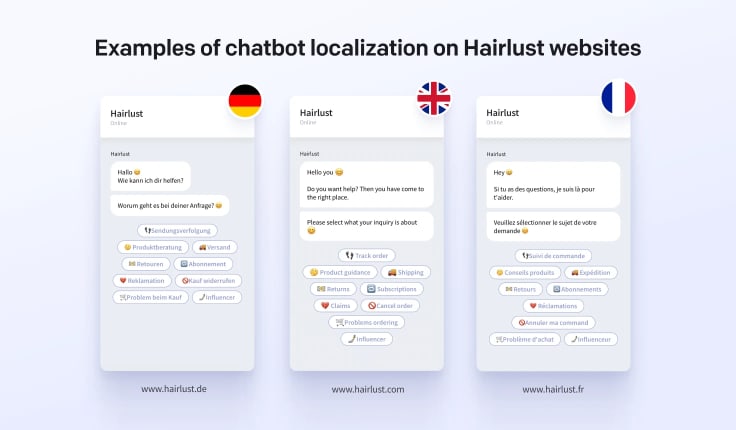
Hairlust used a single chatbot flow across 13 localized ecommerce sites and more than 800,000 monthly visitors. The company reported a 20% reduction in communication time, showing how localization and centralized upkeep can make automation useful across markets.
Localization is not just translation. It includes local policy, product, shipping, and brand context, all of which should be reflected in the agent's knowledge and routing rules.
How to implement an AI customer service agent
Implementation should start with the support problem, not the model or vendor. The most successful teams begin with a narrow workflow and expand only after it works reliably.
| Phase | Main objective | Primary owner | Evidence to review before moving on |
|---|---|---|---|
| Audit | Identify a valuable, low-risk workflow | Support operations | Volume, repeat-contact patterns, and failure cost |
| Design | Define scope, knowledge, permissions, and escalation | Support, product, and security | Written workflow, approved sources, and clear boundaries |
| Test | Find incorrect answers, unsafe actions, and poor handoffs | Support team and subject-matter experts | Realistic test conversations and documented edge cases |
| Pilot | Validate the experience with a controlled audience | Support operations | Resolution quality, repeat contacts, CSAT, and escalations |
| Scale | Expand only proven workflows | Accountable workflow owner | Sustained quality threshold and a recurring review process |
1. Audit your support demand
Review tickets, chats, emails, and call reasons. Look for high-volume requests with a predictable structure, approved answer, and manageable downside if the agent makes a mistake.
Do not choose a first use case solely because it is visible. A simple after-hours order-status workflow may create more value than an ambitious, unproven agent for every support issue.
2. Choose one measurable workflow
Write a single success statement, such as: "The agent will verify an authenticated customer's order status and explain the next step without creating a ticket."
This keeps the work focused. It also tells the team which data, integrations, policy rules, and escalations are required.
3. Prepare the knowledge and data
Identify the source of truth for every answer and action. Remove obsolete articles, resolve contradictory policy language, and define which sources the agent may use.
For data access, establish identity checks, permissions, and logs before connecting the agent to customer records.
4. Design the handoff
Specify what triggers escalation. Examples include low confidence, repeated failed attempts, negative sentiment, requests involving an exception, and any high-risk category.
Specify what the human receives. At a minimum, include the customer's original request, the conversation history, information gathered, sources used, and the action already attempted.
5. Test realistic conversations
Build a test set from anonymized support requests. Include normal requests, unexpected phrasing, incomplete details, conflicting requests, and attempts to persuade the agent to break a policy.
Run the tests with support, operations, security, and product stakeholders. Each group will see different failure modes.
6. Launch with a controlled audience
Start with a limited channel, customer segment, business hour, or workflow. Monitor conversations closely and give customers an obvious route to a person.
Controlled rollout makes it easier to identify whether a problem comes from content, integration, policy design, or the conversation experience.
7. Review outcomes weekly
Review escalations, repeat contacts, negative feedback, failed actions, unresolved conversations, and knowledge gaps. Turn recurring failures into content or workflow improvements.
Scale only when the current workflow meets your agreed quality threshold, not merely because the agent has handled a high volume of messages.
AI customer service agent implementation checklist
Use this checklist before expanding an agent beyond its first workflow.
Scope and value
- The workflow has meaningful volume.
- The customer outcome is clearly defined.
- The expected benefit is measurable.
- A human owner is accountable for the workflow.
Knowledge and data
- Every answer has an approved source.
- Conflicting policy content has been resolved.
- Customer data is limited to what the task requires.
- Source owners and review dates are documented.
Actions and permissions
- The agent can only perform approved actions.
- Identity checks exist before account or financial changes.
- High-impact actions require review or human approval.
- Actions and outcomes can be audited.
Customer experience
- Customers can tell they are interacting with AI.
- The agent uses clear language and confirms completed actions.
- A human handoff route is available.
- Handoff retains conversation context.
Measurement and improvement
- Resolution is defined beyond a generated answer.
- Repeat contacts and escalations are tracked.
- The team reviews customer feedback and edge cases.
- There is a process for pausing or changing a risky workflow.
Metrics for AI customer service agents
Measure whether customers get the right outcome, not simply whether the agent contains the conversation.
| Metric | What it shows | How to use it |
|---|---|---|
| Resolution rate | How often the agent delivers a meaningful outcome | Define resolution carefully. A useful definition may require no repeat contact about the issue within a set period and no immediate request for a person. |
| Escalation rate | Which requests still need human help | Do not treat a lower rate as automatic success. Fast escalation can be the correct outcome for sensitive billing disputes or other high-risk issues. |
| Repeat-contact rate | Whether the customer actually received a useful answer or action | Review the answer, action, and handoff whenever customers return with the same issue. Segment by workflow so an average does not hide a problem in a high-value journey. |
| Customer satisfaction | How customers feel after an automated interaction | Pair CSAT with qualitative review of negative comments and repeat contacts. Ask whether the issue was resolved and whether reaching a person was straightforward. |
| Agent effort after handoff | Whether AI gives the human enough context to work efficiently | Compare similar case types and assess how much time the employee spends after escalation. Raw handle time alone is not enough. |
| Knowledge gaps | Where approved content or workflows are incomplete | Track questions the agent could not answer and assign recurring gaps to a content, product, or policy owner. |
How to choose an AI customer service agent
Choosing an AI agent is not the same as choosing a chatbot widget or a complete customer service platform. Start with the workflow you need it to own.
Evaluate the knowledge layer
Ask which sources the agent can use, how sources are refreshed, whether answers can be traced to a source, and how the system handles conflicting information.
The strongest demo is one that uses your own controlled sample of support content and real customer questions.
Evaluate actions and integrations
Ask which systems the agent can read from and write to. Confirm how it handles authentication, approval requirements, errors, and reversibility.
An agent that only describes a workflow may still be useful, but it should not be sold internally as a system that resolves it.
Evaluate human handoff
Test handoff live. Ask a question the agent cannot answer, request a person, and check what the human receives.
This test reveals more than a polished FAQ demonstration because it shows how the system behaves when automation reaches its limit.
Evaluate governance and controls
Check user permissions, audit logs, source management, change controls, testing environments, and monitoring options.
For regulated or high-risk environments, include security, legal, and compliance teams early rather than adding them after a workflow is built.
Evaluate commercial fit
Model pricing against the volume the agent will realistically handle, including setup, integration work, ongoing content maintenance, and human review.
Do not compare only entry prices. A plan that appears cheap can become expensive if the pricing unit is a resolution, message, action, or channel you use heavily.
Where AI agents fit in customer service automation
AI agents are one layer of a wider automation system. They do not replace the need for accurate self-service content, agent assistance, routing logic, and clear escalation design.
Customer service automation includes deflection, assistance, resolution, and orchestration. AI agents typically sit in the resolution layer, while workflow and routing systems determine what happens around them.
For the wider operating model, including what to automate and what should remain human-led, read our guide to customer service automation.
For a broader introduction to the role of AI in support, see AI in customer service.
How Text supports AI customer service agents
Text gives teams a way to combine AI-powered conversations with live support, ticketing, automation, and human handoff in one workflow.
The practical advantage is continuity. An AI agent can answer from approved knowledge, collect context, or complete an allowed workflow, then transfer the conversation to a person without fragmenting the customer experience.
AI knowledge and controlled answers
Text's AI capabilities can work from business knowledge, including help content, internal documents, URLs, and files. Teams can control the sources the agent uses and improve those sources as new gaps appear.
That helps keep the AI agent grounded in current business information rather than relying on generic responses.
Human handoff with context
When a conversation needs human judgment, the agent can route it to a team member with the conversation and collected context available.
This is particularly useful for issues that begin as a simple FAQ but become a return exception, technical problem, or retention conversation.
A practical first step
Start with a high-volume, low-risk workflow. Measure customer outcomes, review failure patterns, and expand from there.
You can explore Text's AI capabilities or review Text pricing and trial options when you are ready to evaluate a workflow in practice.
Frequently asked questions
What is an AI customer service agent?
An AI customer service agent understands customer requests, retrieves approved information, and can take permitted actions or escalate with context. It is more than an FAQ interface because it can move a support workflow forward.
What is the difference between an AI agent and a chatbot?
A chatbot usually answers questions, follows defined conversational paths, collects details, or routes a request. An AI agent can use connected data and tools to complete approved actions, such as checking an order, updating a record, or starting a return.
Can an AI customer service agent replace human agents?
No. It can remove repetitive work and speed up routine interactions, but people are still essential for complex, sensitive, unusual, or relationship-critical cases.
The best model is usually AI for predictable work and humans for judgment, empathy, exceptions, and accountability.
Which customer service tasks can AI agents automate?
Common examples include order tracking, return eligibility, account access, appointment changes, product guidance, routing, data collection, and ticket creation.
Automate only when the answer is verifiable, the workflow is clear, and the cost of an error is manageable.
How do AI agents improve customer support?
They can provide immediate answers, complete routine actions, reduce repetitive manual work, and help human agents begin complex cases with better context.
The improvement depends on knowledge quality, permissions, workflow design, and a smooth human handoff.
Are AI customer service agents safe to use?
They can be used safely when teams set clear scope, restrict access, protect customer data, test workflows, monitor outcomes, and route high-risk cases to people.
They are not safe when they are given broad permissions, unreliable sources, or no meaningful oversight.
How should a company start with an AI support agent?
Start with one high-volume, low-risk workflow. Prepare the knowledge and data sources, define escalation, test real conversations, launch to a controlled audience, and review outcomes before expanding.
Avoid trying to automate every support issue in the first release.
What should an AI agent do when it cannot help?
It should say so clearly, collect any useful information, and route the customer to the right person or next step. It should not bluff, repeat irrelevant answers, or make the customer restart the conversation.
How do you measure an AI agent's success?
Track meaningful resolution, repeat contacts, escalation quality, customer satisfaction, agent effort after handoff, knowledge gaps, and the safety of completed actions.
Avoid treating a lower escalation rate or higher containment rate as success on its own.
Does an AI customer service agent need a knowledge base?
For most customer-facing use cases, yes. Approved knowledge gives the agent a reliable basis for answers and makes it easier to review mistakes.
An agent can also use connected operational systems, but those systems need clear permissions and controls.
Can AI agents work with ecommerce customer service?
Yes. Ecommerce agents can help with product information, order tracking, delivery updates, returns, exchanges, account questions, and product recommendations.
They should use current catalog, inventory, policy, and order data so the experience remains accurate.
What is agentic AI in customer service?
Agentic AI refers to systems that can plan or take actions toward a goal within defined boundaries. In customer service, that may mean retrieving information, following a workflow, using approved tools, and escalating when the request is outside scope.
The word does not remove the need for governance. More autonomy requires clearer permissions, testing, and oversight.